Malware Removal Instructions

  • Subscribe to our RSS feed.
  • Twitter
  • StumbleUpon
  • Reddit
  • Facebook
  • Digg
Showing posts with label Process Information. Show all posts

Tuesday, 3 December 2013

What is levelqualitywatcher64.exe and how to remove it?

Posted on 10:03 by Unknown

levelqualitywatcher64.exe - Adpeak Service by Adpeak, Inc.


What is levelqualitywatcher64.exe?


levelqualitywatcher64.exe is a part of Level Quality Watcher adware. The program runs automatically on Windows start up. It creates a Windows service with the same name and attempts to access the internet, usually the advertising servers located at amazonaws.com. Firewall programs usually flag this file as potentially dangerous because it tries to download ads from third party servers. What is more, this program has been detected as malicious by multiple anti-virus scanners, Dr.Web, Sophos, ESET, Malwarebytes, just to name a few. It is usually detected as adware, PUP (PUP.Optional.Adpeak) and in some cases even as a Trojan horse (Trojan.DownLoader10.41037). One way or another, this application isn't essential for Windows and should be uninstalled. Keep in mind that it displays ads and may download and install additional malware on your computer. Even though, the file has a valid digital signature it's still a part of ad-supported application which not only displays advertisements but also gathers information about your browsing habits. Most of the time, this adware is bundled with spyware and other malware. It is promoted through the use of fake software updates webpages. If you found this program running in the background then your computer is infected with adware and spyware. I recommend you to remove levelqualitywatcher64.exe from your computer and run a full system scan with recommended anti-malware software.


File name: levelqualitywatcher64.exe
Publisher: Adpeak, Inc.
File Location Windows XP: %PROGRAM_FILES%\Level Quality Watcher\levelqualitywatcher64.exe
File Location Windows 7: %PROGRAM_FILES%\Level Quality Watcher\levelqualitywatcher64.exe
Startup file: HKLM\SYSTEM\ControlSet001\Services\Level Quality Watcher
Read More
Posted in Process Information | No comments

What is levelqualitywatcher32.exe and how to remove it?

Posted on 08:53 by Unknown

levelqualitywatcher32.exe - Adpeak Service by Adpeak, Inc.


What is levelqualitywatcher32.exe?


levelqualitywatcher32.exe is the main executable file of Level Quality Watcher adware. It's a part Adpeak adware family. The file runs automatically on Windows start up. It creates a Windows service with the same name and attempts to access the internet, usually the ad servers located at amazonaws.com. Firewall programs usually flag this file as potentially dangerous because it tries to download ads from third party servers. What is more, levelqualitywatcher32.exe has been detected as malicious by multiple anti-virus scanners, Dr.Web, Sophos, ESET, Malwarebytes, just to name a few. It is usually detected as adware, PUP (PUP.Optional.Adpeak) and in some cases even as a Trojan horse (Trojan.DownLoader10.41037). One way or another, this application isn't essential for Windows and should be uninstalled. Keep in mind that it displays ads and may download and install additional malware on your computer. Even though, the file has a valid digital signature it's still a part of ad-supported application which not only displays advertisements but also gathers information about your browsing habits. I recommend you to remove this adware from your computer and run a full system scan with recommended anti-malware software.


File name: levelqualitywatcher32.exe
Publisher: Adpeak, Inc.
File Location Windows XP: %PROGRAM_FILES%\Level Quality Watcher\LevelQualityWatcher32.exe
File Location Windows 7: %PROGRAM_FILES%\Level Quality Watcher\LevelQualityWatcher32.exe
Startup file: HKLM\SYSTEM\ControlSet001\Services\Level Quality Watcher
Read More
Posted in Process Information | No comments

What is adpeakproxy.exe and how to remove it?

Posted on 08:09 by Unknown

AdpeakProxy.exe - Adpeak Service by Adpeak, Inc.


What is adpeakproxy.exe?


AdpeakProxy.exe runs as a service named "AdpeakProxy". This service runs automatically when Windows starts. As a result your computer may become noticeably slower. This program is a part of Adpeak adware that installs malicious web browser extensions and applications: ScorpionSaver, GetSavin, DealCabby, and CouponAmazing. These programs deliver search-based ads. It can also redirect you to misleading websites and inject contextual ads. Adpeakproxy.exe has the ability to monitor and track your web browsing activity and to update itself without your permission or knowledge. The file is not digitally signed. It's usually located in C:\Program Files\ folder. I recommend you to remove adpeakproxy.exe and related adware from your computer. The program isn't essential for Windows and may cause problems. Since it comes bundled with spyware, please scan your computer with anti-malware software.


File name: adpeakproxy.exe
Publisher: Adpeak, Inc.
File Location Windows XP: C:\Program Files\[adware application]\adpeakproxy.exe
File Location Windows 7: C:\Program Files\[adware application]\adpeakproxy.exe
Startup file: SYSTEM\CurrentControlSet\Services 'AdpeakProxy'

Read More
Posted in Process Information | No comments

Saturday, 9 November 2013

What is cltmngui.exe and how to remove it?

Posted on 12:44 by Unknown

cltmngui.exe - Search Protect by Conduit


What is cltmngui.exe?


cltmngsvc.exe is a potentially unwanted application that comes along with the Search Conduit browser hijacker. It runs automatically every time Windows starts and displays SearchProtect GUI which allows you to change certain settings related to Conduit malware, for example select your homepage and change new tab preferences. Of course, recommended settings will be set to Conduit search engine and it could be difficult to change them. Anti-malware scanners detect it as PUP or adware, mostly PUP.Optional.Conduit.A or Conduit (fs). Keep in mind that cltmngsvc.exe isn't the main component of the browser hijacker so the original detection ratio is a lot higher than just 5%. Last time I checked it, more than 10 anti-virus scanners flagged one or more Conduit files as malicious or potentially dangerous, including this one, so I think it's a good indication that this file and related modules can do more harm than good. What is more, this application comes bundled with adware and spyware. It may display ads and even send certain information about your web browser habits to third party servers. I recommend you to remove cltmngui.exe and related malware from your computer. Scan your computer with recommended anti-malware software.


File name: cltmngui.exe
Publisher: Conduit Ltd.
File Location Windows XP: C:\PROGRA~2\SearchProtect\UI\bin\cltmngui.exe
File Location Windows 7: C:\PROGRA~2\SearchProtect\UI\bin\cltmngui.exe
Startup file: HKEY_CURRENT_USER\SOFTWARE\Microsoft\Windows\CurrentVersion\Run 'SearchProtect'
Read More
Posted in Process Information | No comments

Thursday, 7 November 2013

What is BrowserSafeguard.exe and how to remove it?

Posted on 08:54 by Unknown
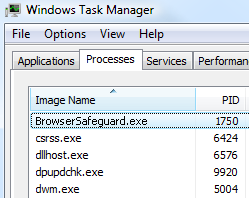
BrowserSafeguard.exe process Task Manager

BrowserSafeguard.exe - BrowserSafeguard by iBryte.


What is BrowserSafeguard.exe?


BrowserSafeguard.exe is the main executable file of a program called BrowserSafeguard. This application claims to add even more security and protect you from dangerous content that anti-virus programs may not consider. However, it remains unclear what exactly it does and how this additional layer of security may help you. Besides, it's an ad-supported application. It will certainly display ads and redirect you to rockettab.com search engine. While it's not a virus or a Trojan horse, at least 10 anti-virus scanners picked up it as adware or PUP. Panda Antivirus for instance detected it as Trj/Genetic.gen. But more common detection would be Win32:IBryte-BP [PUP] or ADWARE/Adware.Gen7. Symantec detects this application as WS.Reputation.1 which means it may use unethical distribution tactics. And indeed, most of the users who had this malware installed on their computers couldn't tell where did it come from. But the answers is pretty simple, this application comes bundled with other unwanted programs and adware. Once installed, BrowserSafeguard.exe is configurated to run automatically when Windows starts. What is more, it may change your proxy settings, so it would be better to uninstall this application via Control Panel. I recommend you to remove BrowserSafeguard.exe and related malware from your computer. Scan your computer with recommended anti-malware software.


File name: BrowserSafeguard.exe
Publisher: iBryte
File Location Windows XP: C:\Program Files (x86)\BrowserSafeguard\BrowserSafeguard.exe
File Location Windows 7: C:\Program Files (x86)\BrowserSafeguard\BrowserSafeguard.exe
Startup file: HKEY_CURRENT_USER\SOFTWARE\MICROSOFT\WINDOWS\CURRENTVERSION\RUN\BROWSERSAFEGUARD = %PROGRAMFILES%\Browsersafeguard\Browsersafeguard.exe

Read More
Posted in Process Information | No comments

Tuesday, 1 October 2013

What is BitGuard.exe and how to remove it?

Posted on 12:33 by Unknown

BitGuard.exe - Browser Protection Service by PerformerSoft (iBario LTD).


What is BitGuard.exe?


BitGuard.exe runs as a service named 'BitGuard'. It claims to block malicious browser extensions, browser home page hijacks, browser search manipulation, however, the truth is quite the opposite - it is designed to protect the browser hijacker called Search-Gol so that it remains the default browser search engine. More than ten anti-virus scanners have detected possible malware in BitGuard.exe, for instance, APPL/BProtector.Gen, Win32:BProtect-A [PUP], BProtector and a variant of Win32/bProtector.A. If you have this program running in Task Manager then your computer is infected by malware. You web browser is probably hijacked by SearchGol, Delta-Search or similar browser hijackers. You may also see in text (contextual) advertisements or pop ups on your computer. This malware can also add alternative redirection "page not found" and modify search functionality from the address bar. There are variants of BitGuard with spyware modules which means that not only it modifies the default search engine and search provider but also may gather information about you, your browsing and Internet usage habits, as well as other data. I recommend you to remove BitGuard.exe and related malware from your computer. Scan your computer with recommended anti-malware software.


File name: BitGuard.exe
Publisher: PerformerSoft (iBario LTD)
File Location Windows XP: C:\Documents and Settings\All Users\Application Data\BitGuard\2.6.1673.238\{UNIQUE ID}\BitGuard.exe
File Location Windows 7: C:\ProgramData\BitGuard\2.6.1673.238\{UNIQUE ID}\BitGuard.exe
Startup file: SYSTEM\CurrentControlSet\Services 'BitGuard'
Read More
Posted in Process Information | No comments

Sunday, 29 September 2013

What is QuickShare.exe and how to remove it?

Posted on 11:20 by Unknown

QuickShare.exe - QuickShare by Linkury Inc.


What is QuickShare.exe?


QuickShare.exe is an application that simplifies the process of online sharing. For example, if you want to share an image you just need to place the pointer over the image and choose the icon of the desired network when the quick bar appears. Unfortunately, it does more than that. QuickShare.exe has been classified as adware/trojan by more than 20 anti-virus scanners. Furthermore, this application installs additional components to protect itself from being removed. The main protection component is classified as malware too: Trojan.Win32.SProtector.AMN. When installed, will start automatically when Windows starts. Since the authors of this application included additional code that delivers the ads, you will probably see advertisements every fine or ten minutes based on your viewing habits. QuickShare is often included automatically without you knowing it when you download from certain download websites and free applications. It may also change the default search engine in your web browser's built-in search box and he default home page. I recommend you to remove QuickShare.exe from your computer. You should scan your computer with recommended anti-malware software as well.


File name: QuickShare.exe
Publisher: Linkury Inc.
File Location Windows XP: C:\Documents and Settings\[UserName]\Smartbar\Application\QuickShare.exe
File Location Windows 7: C:\Users\[UserName]\Appdata\Local\Smartbar\Application\QuickShare.exe
Startup file: HKEY_CURRENT_USER\SOFTWARE\Microsoft\Windows\CurrentVersion\Run 'Browser Infrastructure Helper'

Read More
Posted in Process Information | No comments

What is SoftwareUpdater.Ui.exe and how to remove it?

Posted on 10:11 by Unknown

SoftwareUpdater.Ui.exe - SoftwareUpdater by Vittalia Installer.


What is SoftwareUpdater.Ui.exe?


SoftwareUpdater.Ui.exe starts every time you open your web browser but this process isn't essential for Windows because it's not a system file. It's a software updater installed by Vittalia, DealPly, Auto Lyrics and other malware. The main update process including Windows Service named SrvUpdater (UpdaterService.exe) has been classified as malware and potentially unwanted software. Comodo Internet Security classifies it as Heur.Corrupt.PE. Trend Micro detects this file as TROJ_GEN.F47V0531. Other anti-virus applications detected possible adware and spyware in SoftwareUpdater.Ui.exe as well. This application is usually installed without direct consent of the user. What is more, it adds a background controller service that is set to automatically run, this is done to avoid any UAC prompts. It means that you probably won't even notice that this process is running in the background and using up your RAM, about 17.58 MB on average. Might be even more when the process downloads and install additional software onto your computer. I recommend you to remove SoftwareUpdater.Ui.exe from your computer. You should scan your computer with recommended anti-malware software as well.


File name: SoftwareUpdater.Ui.exe
Publisher: Vittalia Installer by Filewon
File Location Windows XP: C:\Program Files\softwareupdater\SoftwareUpdater.Ui.exe
File Location Windows 7: C:\Program Files (x86)\softwareupdater\SoftwareUpdater.Ui.exe
Startup file: SYSTEM\CurrentControlSet\Services 'SrvUpdater'

Read More
Posted in Process Information | No comments

Tuesday, 6 August 2013

What is MagniPic.exe and how to remove it?

Posted on 08:40 by Unknown

MagniPic.exe - Updater by MagniPic


What is MagniPic.exe?


MagniPic.exe belongs to an application called MagniPic which allows you to magnify Facebook images just by hovering over them. I'm not quite sure whether it's a good application to have or not, maybe someone will find it very useful but there's definitely something everyone has to know before installing it. MagniPic.exe is detected as Adware or PUP by most antivirus programs, for example PUP.Adware.MagniPic. There are a few antivirus engines that flag this application as a Trojan horse because it collects browsing information and then sends it to remote servers without your knowledge and permission. Usually, Trojans do the same thing. When your computer is infected you will notice that words get underlined and hovering over them shows popup advertisements (see the image below). Very often, it comes bundled with PrivitizeVPN and other potentially unwanted applications. It may also cause all web browsers to freeze. Some users noticed that their PCs suddenly became noticeably slower after installing MagniPic. To conclude, it's not essential for Windows and may cause problems. I recommend you to remove MagniPic.exe from your computer and run a full system scan with recommended anti-malware software.


Security Rating: Potentially Dangerous

File name: MagniPic.exe
Publisher: MagniPic
File Location Windows XP: C:\Documents and Settings\All Users\Application Data\Premium\MagniPic\MagniPic.exe
File Location Windows 7: C:\ProgramData\Premium\MagniPic\MagniPic.exe
Startup file: HKEY_CURRENT_USER\SOFTWARE\Microsoft\Windows\CurrentVersion\Run 'Updater'

Read More
Posted in Process Information | No comments

Monday, 22 July 2013

What is eGdpSvc.exe and how to remove it?

Posted on 08:49 by Unknown

eGdpSvc.exe - System eSafe update service by eSafe Security Co., Ltd.


What is eGdpSvc.exe?


eGdpSvc.exe is a part of eSafe Security Control software. The file has a valid certificate issued to Banyan Tree Technology Limited by GlobalSign. eGdpSvc.exe runs as Windows service with extensive privileges which means that it may connect to remote servers and download additional files onto your computer in the background without your permission and knowledge. It's not essential for Windows and may cause problems. Besides, most of the time, this application is bundled with adware and potentially unwanted software. It may install adware and browser hijackers on your computer, for example Qvo6. Since egdpsvc.exe runs as a background Windows service it may slow down your computer a bit. Even though, software name looks reliable, this application is potentially unwanted. I recommend you to remove eGdpSvc.exe from your computer. You should scan your computer with recommended anti-malware software as well.


File name: eGdpSvc.exe
Publisher: eSafe Security Co., Ltd
File Location Windows XP: C:\Documents and Settings\All Users\Application Data\eSafe\eGdpSvc.exe
File Location Windows 7: C:\ProgramData\eSafe\eGdpSvc.exe
Startup file: SYSTEM\CurrentControlSet\Services 'eSafeSvc'

Read More
Posted in Process Information | No comments

What is WajamUpdater.exe and how to remove it?

Posted on 07:56 by Unknown

WajamUpdater.exe - Auto-updater by Wajam.


What is WajamUpdater.exe?


WajamUpdater.exe is an auto-updater for Wajam social search engine. The process runs automatically every time Windows starts and checks for available software updates. At least 8 antivirus engines have detected malware in Wajam Browser Helper Object and WajamUpdater.exe. Usually, these files are detected as adware or PUP (PUP.Wajam, Win32/Wajam.A), some antivirus engines flag it as a Trojan but personally I think such classification is too strict. In my opinion Adware or PUP is enough. Very often Wajam comes bundled with other applications, Delta Toolbar, Search Protect by conduit to name a few. If you found WajamUpdater.exe running on your computer then there's a good chance that you've installed other adware or potentially unwanted programs on your computer. Most users decide to remove this software because it's either not useful and makes their computer run slower, display ads or causes other issues. It goes without saying, that this application is not essential for Windows and may cause problems. I recommend you to remove WajamUpdater.exe and from your computer and run a full system scan with recommend anti-malware software.


File name: WajamUpdater.exe
Publisher: Wajam
File Location Windows XP: C:\Program Files\Wajam\Updater\WajamUpdater.exe
File Location Windows 7: C:\Program Files\Wajam\Updater\WajamUpdater.exe
Startup file: SYSTEM\CurrentControlSet\Services 'WajamUpdater'

Read More
Posted in Process Information | No comments

Tuesday, 16 July 2013

What is WebCakeDesktop.Updater.exe and how to remove it?

Posted on 08:40 by Unknown

WebCakeDesktop.Updater.exe - WebCake.Desktop.Updater by WebCake LLC.


What is WebCakeDesktop.Updater.exe?


WebCakeDesktop.Updater.exe is a part of WebCake adware. This particular file runs automatically every time Windows starts. It stays active in the background and checks for software updates. Sometimes, you may find two or more WebCakeDesktop.Updater.exe running in Task Manager. Even though, most antivirus products do not block this application, quite a few detect it as adware or PUP. Once installed, this adware may display advertisements and popups on your computer. It may collect information about your system and browsing habits. Later such information us typically used to display the most relevant advertisements on your PC. Very often, when users find this process running they also detect other adware or even malware on their computers. So, if you have it too, then there's a good chance that your computer is infected with malware as well. It goes without saying, that this applications not essential for Windows and may cause problems. I recommend you to remove WebCakeDesktop.Updater.exe and from your computer and run a full system scan with recommend anti-malware software.


File name: WebCakeDesktop.Updater.exe
Publisher: WebCake LLC
File Location Windows XP: C:\Program Files\WebCake\WebCakeDesktop.Updater.exe
File Location Windows 7: C:\Program Files\WebCake\WebCakeDesktop.Updater.exe
Startup file: HKEY_CURRENT_USER\SOFTWARE\Microsoft\Windows\CurrentVersion\Run 'WebCake.Desktop.Updater'

Read More
Posted in Process Information | No comments

Sunday, 14 July 2013

What is MyPC Backup.exe and how to remove it?

Posted on 09:00 by Unknown

MyPC Backup.exe - Cloud backup software by MyPCBackup LTD.


What is MyPC Backup.exe?


MyPC Backup.exe is the main executable file of a small Desktop application called MyPC Backup. This application is created by MyPCBackup LTD and digitally signed by JDI BACKUP LIMITED. It allows you to backup all of your computer files to the cloud. So, it's basically, just another cloud storage service. MyPC Backup.exe isn't malicious but since it comes bundled with adware and PUPs, most users think it's malware. Besides, it displays rather annoying pop up notifications every few hours in the right hand lower corner reminding you that your files are not backed up (see the image below). "Reminder: Your computer is not backed up, Backup Your Files Online Today". MyPC Backup.exe runs automatically each time Windows starts. Needless to say, it's not essential for Windows and may cause problems. Besides, if you are getting MyPCBackup.exe notifications then there's a good chance that your computer is infected with adware and potentially unwanted software. Especially, if you didn't install MyPCBackup yourself. It probably came bundled with adware. I recommend you to remove MyPC Backup.exe and from your computer and run a full system scan with recommend anti-malware software.


File name: MyPC Backup.exe
Publisher: MyPCBackup LTD
File Location Windows XP: C:\Program Files\mypc backup\mypc backup.exe
File Location Windows 7: C:\Program Files\mypc backup\mypc backup.exe
Startup file: HKEY_CURRENT_USER\SOFTWARE\Microsoft\Windows\CurrentVersion\Run 'MyPC Backup'

Read More
Posted in Process Information | No comments

Saturday, 13 July 2013

What is BrowserDefender.exe and how to remove it?

Posted on 10:22 by Unknown

BrowserDefender.exe - Application Manager by PerformerSoft LLC


What is BrowserDefender.exe?


BrowserDefender.exe is an application manager created by PerformerSoft LLC. It is typically bundled with adware and potentially unwanted software. As the name suggests, this application is designed to keep your web browser safe from default search engine and home page hijacking. It may also block any attempts to install additional extensions, even though all the preferences can be changed at any time. Some people may think it's a useful utility but it's not. While it blocks third party browser hijackers, this application manager also blocks Google or Bing search providers. In other words, you may not be able to change your default search engine or home page. As a matter of fact, most users who installed BrowserDefender.exe on their computer though it was an actual virus. What is more, multiple anti-virus scanners have detected possible malware in this application. Besides, most PerformerSoft LLC products have some sort of spyware modules that may track your browsing habits. Needless to say, it's not essential for Windows and may cause problems. I recommend you to remove BrowserDefender.exe from your computer.


File name: BrowserDefender.exe
Publisher: PerformerSoft LLC
File Location Windows XP: C:\Documents and Settings\All Users\Application Data\BrowserDefender\2.6.1339.144\[custom]\BrowserDefender.exe
File Location Windows 7: C:\ProgramData\BrowserDefender\2.6.1339.144\[custom]\BrowserDefender.exe
Startup file: HKLM\System\CurrentControlSet\Services\BrowserDefendert

Read More
Posted in Process Information | No comments

Tuesday, 9 July 2013

What is Delta Chrome Toolbar and how to remove it?

Posted on 08:13 by Unknown

Delta Chrome Toolbar - by Babylon Ltd.


What is Delta Chrome Toolbar?


Delta Chrome Toolbar is a web browser add-on that usually comes bundled with third party software. Most users do not know where they got it, so it's not surprising at all that overall sentiment is bad. This web browser add-on not only tracks your browsing habits but also changes home page and default search engine provider to delta-search.com. Since it's an ad-supported product, it will display advertisements on your computer. Some ads might be misleading, for example, you may get an ad claiming that your computer is infected or has critical system errors. This is a typical scam designed to trick you into paying for fake Windows optimization software. Other ads might be inappropriate for kids or even embarrassing. More than 90% of users think that Delta Chrome Toolbar should be removed from the system. Besides, this toolbar takes up too much space in Google Chrome pushing the content down. It's not essential for Windows and may cause problems. I recommend you to remove Delta Chrome Toolbar from your computer.


Security Rating: Potentially Dangerous

File name: DeltaTB.exe
Publisher: Babylon Ltd.
File Location Windows XP: C:\Program Files\delta\delta\
File Location Windows 7: C:\Program Files\delta\delta\
Startup file: SYSTEM\CurrentControlSet\Services 'BrowserProtect'

Read More
Posted in Process Information | No comments

Friday, 28 June 2013

What is CltMngSvc.exe and how to remove it?

Posted on 10:02 by Unknown

cltmngsvc.exe - Search Protect by Conduit Ltd.


What is CltMngSvc.exe?


cltmngsvc.exe is a part of the Search Conduit browser hijacker. It runs as a Windows service called 'CltMngSvc' with extensive privileges. This service enables auto-updates of Search Protect by Conduit. It runs automatically every time Windows starts. cltmngsvc.exe and related components are designed to protect search.conduit.com from being replaced with competing search engines and web browser add-ons. There are at least seven different variants of this file and most of them are flagged and dangerous or potentially dangerous by multiple antivirus products. Search Conduit displays misleading and sometimes even offending ads on your computer which is why most users decide to get rid of it. It's not essential for Windows and may cause problems. What is more, cltmngsvc.exe comes along with adware and potentially unwanted programs that may collect certain information about your browsing habits and searches. Needless to say, I recommend you to remove cltmngsvc.exe from your computer.


File name: cltmngsvc.exe
Publisher: Conduit Ltd.
File Location Windows XP: C:\Program Files\SearchProtect\bin\CltMngSvc.exe
File Location Windows 7: C:\Program Files\SearchProtect\bin\CltMngSvc.exe
Startup file: SYSTEM\CurrentControlSet\Services 'CltMngSvc'

Read More
Posted in Process Information | No comments

What is Search Assistant WebSearch 1.74 and how to remove it?

Posted on 09:23 by Unknown

Search Assistant WebSearch 1.74 - Search Assistant SProtector


What is Search Assistant WebSearch 1.74?


Search Assistant WebSearch 1.74 is adware developed by Search Assistant SProtector. The main module comes bundled with other malware. It installs a browser helper object which collects information about your browsing habits, including visited websites and search terms. Third-party advertising networks use this information to display relevant ads when browsing the internet. Please note that Search Assistant WebSearch 1.74 may display pop up ads and also inject ads into websites you visit. What is more, this adware may change your home page and default search engine. Some variants of this application may block any attempt to change your search engine. The main file sprotector.dll has been flagged as malicious by at least 14 antivirus products. Detection: Adware.BGuard.B, Worm.SProtector.Gen, ADW_SPROTECT, a variant of Win32/SProtector.A. I recommend you to remove Search Assistant WebSearch 1.74 from your computer and run a full system scan with recommended anti-malware software.


File name: sprotector.dll
Publisher: Search Assistant SProtector
File Location Windows XP: C:\Program Files\websearch\sprotector.dll
File Location Windows 7: C:\Program Files\websearch\sprotector.dll

Read More
Posted in Process Information | No comments

What is Search Protect by conduit and how to remove it?

Posted on 08:55 by Unknown

Search Protect by Conduit Ltd.


What is Search Protect by conduit?


Search Protect by conduit is a part of the Conduit browser hijacker which will change your home page and default search engine to search.conduit.com. It forces users to use Conduit Search and blocks setting reversions attempted by users who want to recover their settings after they are hijacked by this malicious browser hijacker. It's not essential for Windows and may cause problems. It may slow down your computer, especially when online. What is more, Conduit malware displays ads on infected computers and redirects users to misleading websites when searching directly through the address bar. Most of the time, it is side-installed with adware and potentially unwanted applications, for instance Optimum Installer. If you web browser has been hijacked then there's a good chance that your computer is infected with adware as well. I recommend you to remove Search Protect by conduit from your computer. Use recommend anti-malware software to remove related adware and PUPs.


File name: cltmng.exe
Publisher: Conduit Ltd.
File Location Windows XP: C:\Program Files\searchprotect\bin\cltmng.exe
File Location Windows 7: C:\Program Files\searchprotect\bin\cltmng.exe
Startup file: HKEY_CURRENT_USER\SOFTWARE\Microsoft\Windows\CurrentVersion\Run 'SearchProtect'

Read More
Posted in Process Information | No comments
Older Posts Home
Subscribe to: Posts (Atom)

Popular Posts

  • Remove Viruses Located in the $Recycle.Bin Folder (Uninstall Guide)
    The $Recycle.Bin folder is a genuine Windows folder. It is part of the file system. It is there to give you a chance to undelete a file when...
  • Remove Ask Search and Ask Toolbar (Uninstall Guide)
    Ask Search and Ask Toolbar are very often incorrectly classified as virus/spyware that may cause search redirects. The majority of us pref...
  • Facebook Security and Privacy Best Practices
    Facebook is the most popular social networking site. Nearly all of my friends have Facebook accounts. They log on to Facebook at least a cou...
  • How to Remove Easy Scan (Uninstall Guide)
    Easy Scan is a rogue application that pretends to be legitimate software, in this case registry cleaner and hard drive optimization program...
  • Smartphone Security: Using Your Mobile Phone Safely
    Smartphone is like a little copy of your computer with lots of personal information: photos, text messages, access to e-mail account and oth...
  • Fake avast! Antivirus: Avast-antivirus-francais.exe
    Cyber-criminals are attempting to benefit from unexperienced web users who are looking for anti-virus software. We found a couple of mislead...
  • Antivired.com and other Antivirus Monitor Related Domains
    Just a short note about several malicious domains related to the Antivirus Monitor fraud. This rogue anti-virus program reports non-existent...
  • Boxore Adware (Uninstall Guide)
    Today we came across another adware application called Boxore. It's distributed the old-fashioned way: people search for free online mov...
  • Show Hidden Files and Folders in Windows
    By default Microsoft Windows hides important files from being seen with Windows Explorer in order to protect these files from being modified...
  • Antispyis.com and other Antivirus Scan related domains
    New additions of misleading websites which promote a rogue security application called Antivirus Scan. antispyis.com afantispy.net softwaree...

Categories

  • Adware
  • Answers
  • Antivirus software
  • Browser Hijackers
  • Cloud Computing
  • Fake Alerts
  • Giveaways
  • Hoax
  • How-To
  • IaaS
  • Internet
  • Malicious websites
  • Malware
  • PaaS
  • Parental Controls
  • Passwords
  • Phishing
  • Process Information
  • Ransomware
  • Rogue programs
  • Rootkits
  • SaaS
  • Security Advisories
  • Spam
  • Spyware
  • Trojans
  • Viruses
  • Web Browsers
  • Worms

Blog Archive

  • ▼  2013 (173)
    • ▼  December (6)
      • Squirrel Web Removal Guide
      • What is levelqualitywatcher64.exe and how to remov...
      • What is levelqualitywatcher32.exe and how to remov...
      • What is adpeakproxy.exe and how to remove it?
      • How to remove ScorpionSaver adware (Uninstall Guide)
      • Remove Level Quality Watcher, removal guide
    • ►  November (13)
    • ►  October (11)
    • ►  September (20)
    • ►  August (4)
    • ►  July (17)
    • ►  June (31)
    • ►  May (25)
    • ►  April (15)
    • ►  March (17)
    • ►  February (7)
    • ►  January (7)
  • ►  2012 (86)
    • ►  November (2)
    • ►  October (4)
    • ►  September (6)
    • ►  August (6)
    • ►  July (11)
    • ►  June (1)
    • ►  May (5)
    • ►  April (7)
    • ►  March (7)
    • ►  February (17)
    • ►  January (20)
  • ►  2011 (239)
    • ►  December (8)
    • ►  November (18)
    • ►  October (21)
    • ►  September (24)
    • ►  August (28)
    • ►  July (32)
    • ►  June (16)
    • ►  May (23)
    • ►  April (15)
    • ►  March (16)
    • ►  February (9)
    • ►  January (29)
  • ►  2010 (2)
    • ►  December (2)
Powered by Blogger.

About Me

Unknown
View my complete profile